
Read the article
here.WindBorne Weather Events started as an internal tracker our own meteorologists used. It’s now available through the WindBorne API.
Most weather models produce their forecasts as a grid. The model divides the globe into cells and predicts temperature, wind, humidity and dozens of other variables for each one. Our AI forecast model, WeatherMesh-6, for example, covers about a million cells every three hours out to 15 days. While a grid is the right format for running a model, it is not how people experience weather. People notice events, and extreme ones most of all (an atmospheric river that brings days of rain and swollen rivers, a heatwave that makes afternoons too hot to be outside, a coldwave that freezes pipes and grounds flights).
A grid never says “heatwave.” To find one, someone has to look across the forecast maps and judge whether the heat is unusual for that place and time of year, where it’s headed, how severe it could get, and whether the latest run agrees with the last one. Doing that worldwide, for every run, takes time even for an experienced meteorologist, and many teams don’t have one.
Weather Events handles that tracking automatically, so meteorologists can spend their time on interpretation and teams without one can still follow the events that matter to them.
What are Weather Events?
An event is a patch of unusual weather that we can draw a boundary around and follow through time. More precisely, it is a meteorological phenomenon that occupies a bounded region over a fixed time interval and can be tracked as its extent and intensity change across forecast hours and model runs.
Weather Events currently detects four types: (1) atmospheric rivers, (2) heatwaves, (3) coldwaves, and (4) fronts.
Events are detected on the WeatherMesh-6 ensemble mean across the full 15-day forecast, and they refresh hourly with every new model run. Each event keeps one ID across forecast hours and model runs, so you can see how its forecast changes over time.
Events are defined relative to local climatology rather than fixed thresholds. A heatwave, for example, is triggered when daily highs exceed the local 85th percentile for that calendar day for at least three consecutive days. That is what lets the same method flag unusual heat in Seattle and in Chennai, even though the temperatures that trigger it are very different.
How Weather Events Works
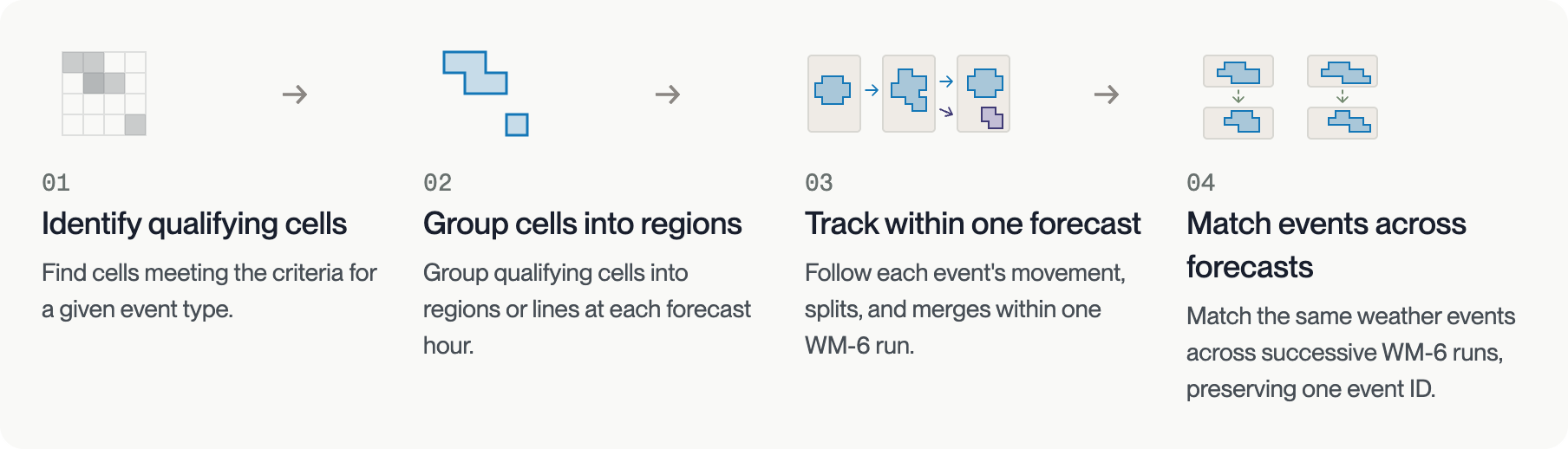
Every event type passes through the same four-stage pipeline:
- Detection: each grid cell is tested against event-specific criteria at every forecast hour
- Grouping: qualifying cells become polygons or, for fronts, lines
- Tracking within a run: objects at successive forecast hours are linked using MODE (Method for Object-Based Diagnostic Evaluation) scores for distance, overlap, size, shape, and orientation, with splits and merges kept as parent and child events
- Matching across runs: tracks from successive runs are aligned by valid time and matched, so an event keeps its ID as the forecast is revised
Detection is specific to each event type:

- Atmospheric rivers are detected from integrated water vapor transport (IVT), adapting Guan and Waliser's tARget v4 method against a 1980 to 2019 ERA5 climatology. Severity runs from AR1 to AR5, adapting the intensity-and-duration scale of Ralph et al. (2019).

- Heatwaves and coldwaves require daily maximum (heat) or minimum (cold) 2 m temperature beyond the local 85th or 15th percentile for at least three consecutive days over land, using ERA5 1991 to 2020 percentiles. Three stricter tiers apply at the 90th, 95th, and 98th percentiles for heat and the 10th, 5th, and 2nd for cold.

- Fronts come from the FrontFinder neural network (Justin et al., 2025), which assigns cold, warm, stationary, and occluded probabilities from WeatherMesh-6 fields. Lines follow the crests of those probabilities, and one continuous boundary can contain several front types. Fronts are the most experimental of the four.
Full detection criteria and severity tables are in the About Weather Events documentation.
Tracking the Western US Heatwave

Heatwave #14030 built across the western United States in early October. In the WeatherMesh-6 run initialized October 2, the event starts with a P98 core along the California coast and spreads across most of the West by October 5. By October 10 the footprint has split into an interior patch and a southern California patch, and by October 11 only a small area of southern California and Baja California remains. The run had the heat lingering longest in southern California after the rest of the West had cooled.
How to Access Weather Events
Weather Events is accessible via REST API with JSON and GeoJSON response formats. Endpoints return all events in a run, an index of events across runs, the history of a single event, and the events affecting up to ten coordinates. An events.available webhook notifies subscribers when a run's event products are ready, filtered by event type, time window, and region. In practice, you subscribe to a region and an event type, the webhook notifies you when a run flags a coldwave over your assets, and you follow that event by its ID as each hourly run revises it.
Weather Events is an experimental v1. Each event is the output of a versioned detection and tracking method applied to the WeatherMesh-6 ensemble mean. We plan to add more event types and features in future versions.
API documentation for Weather Events is now available at api.windbornesystems.com.


